How can I book an appointment to submit REP/COI application?

You can visit ICA e-Service to book a time slot to submit your REP/COI application at the ICA Services Centre.
You need to enter the following information:
(1) National Registration Identity Card (NRIC) Number and
(2) Number of people applying for REP/COI (e.g. including family members)
(3) Contact Number
After keying in the required information as listed above, click on the submit button (shown below). 
You will see the following screen once you have successfully logged into the e-Appointment system.
- You will not be able to click on the days highlighted in grey (appointment slots have been fully booked), pink (non-working days) and white (dates not released/available for booking).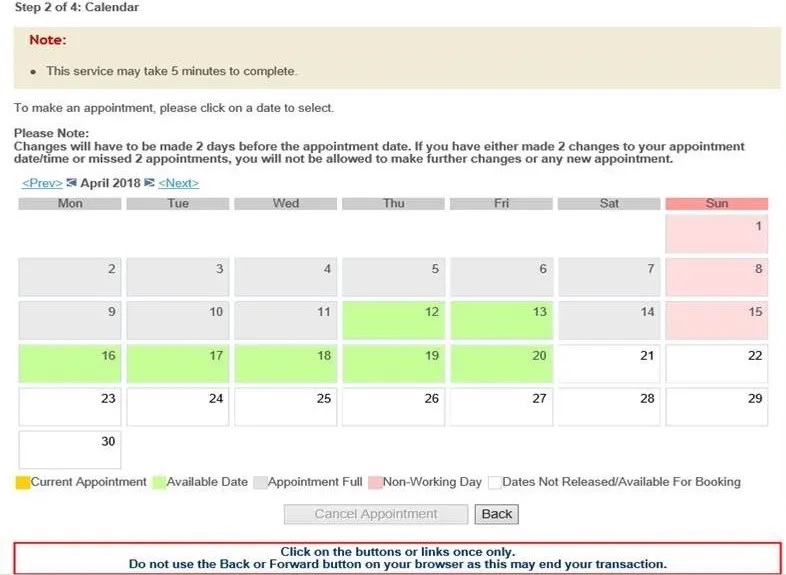
To book your appointment, click on your preferred date (those available in green) and the following screen will be shown.
- Select your preferred timing (check on the radio button) and click the submit button.
- When your preferred timing has been successfully accepted, a confirmation message will be displayed. You are advised to adhere to the new appointment timing.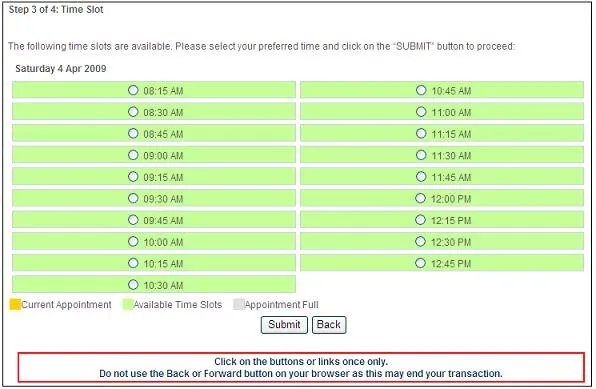
Once you have booked your appointment, you are required to print the appointment acknowledgement page (shown below). Please bring this print-out along for your appointment to retrieve your queue ticket at the Self-Service Ticketing Kiosk.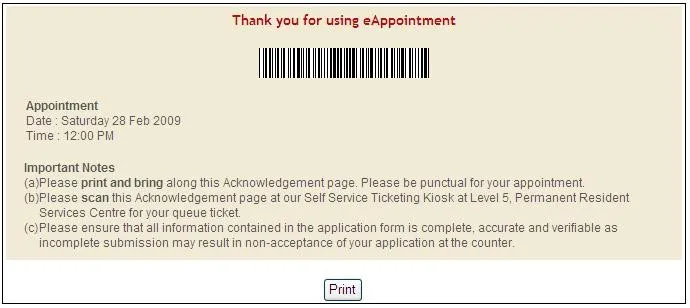
This information is sourced from ICA
Related questions
How can I change an appointment to submit REP/COI application?
How can I book the appointment for Completion of Student's Pass formalities?
How can I book group appointment for Completion of Student's Pass formalities?
Why do I need to book an appointment online for the completion of Singapore PR formalities?
