What if I forget my myLibrary ID or password?

To retrieve your myLibrary ID and password, you have 2 options
1. Online with Singpass or NRIC / FIN number:
a. Visit the myLibrary website and sign in using your Singpass or NRIC/FIN number.
b. Once signed in, the system will automatically detect if you have a myLibrary ID and display it.
c. You can also reset your password if you've forgotten it through this process.
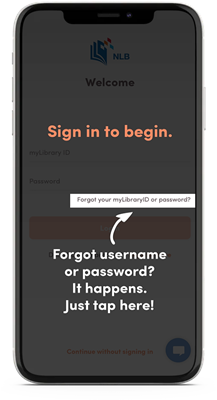
2. Via the NLB Mobile app:
a. Download and open the NLB Mobile app on your device.
b. Click on "Forgot your myLibrary username or password"
c. Follow the prompts to retrieve your myLibrary ID and reset your password if necessary.
Related questions

Need more help?
Get in touch